
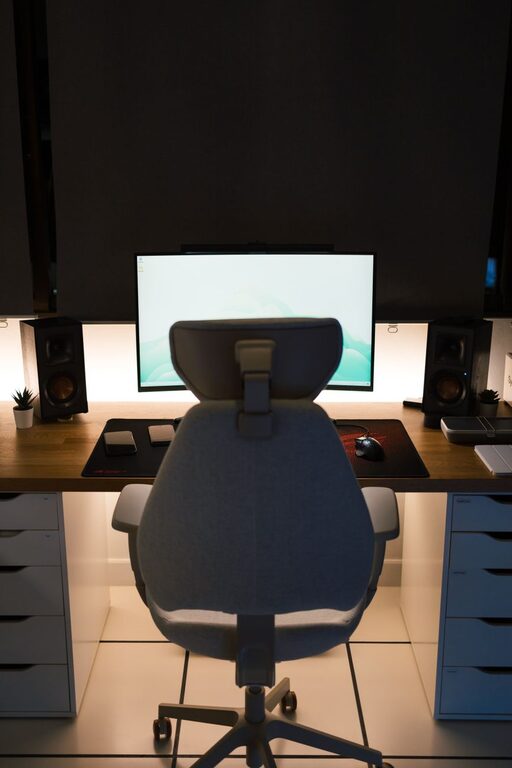
Creating a relaxing home workspace is essential for anyone working remotely or spending significant time at home on tasks. A calm, comfortable environment helps reduce stress, increase focus, and maintain overall well-being. Whether you have a dedicated room or a small corner for your work, there are several ways to improve your space to make it both productive and inviting.
Why a Relaxing Workspace Matters
A workspace that feels cluttered or uncomfortable can quickly lead to distractions and fatigue. On the other hand, a well-designed, peaceful environment supports concentration and encourages better work habits. When your workspace feels like a pleasant place to be, you’re more likely to stay motivated and complete tasks efficiently.
Choose the Right Location
The first step to creating a relaxing workspace is selecting the best spot in your home.
– Natural Light: If possible, position your desk near a window to benefit from natural sunlight. Natural light boosts mood and energy levels.
– Quiet Area: Pick a spot away from high-traffic areas and noise sources like TV rooms or busy kitchens.
– Space Considerations: Ensure you have enough room for your essentials — computer, notebooks, and personal items — without feeling cramped.
Invest in Comfortable Furniture
Comfort plays a huge role in maintaining productivity over long hours.
– Ergonomic Chair: Choose a chair that supports your back with adjustable height and good cushioning. Poor posture can cause discomfort and reduce focus.
– Desk at the Right Height: Your desk should allow your elbows to rest comfortably at a 90-degree angle when typing.
– Additional Supports: Consider wrist rests, footrests, or adjustable monitor stands to tailor your workspace ergonomics.
Declutter and Organize
A clean, tidy workspace helps clear your mind and reduces anxiety.
– Minimal Essentials: Keep only the items you need on your desk, like your computer, a notebook, and a pen holder.
– Storage Solutions: Use shelves, drawers, or storage bins to keep papers, chargers, and office supplies organized and out of sight.
– Regular Cleanup: Set aside a few minutes daily to tidy your workspace and maintain order.
Personalize Your Space Wisely
Adding personal touches makes your area inviting but avoid overdoing it.
– Plants: Small indoor plants or succulents add life to your desk and can improve air quality.
– Artwork: Simple, inspiring art or photos can boost your mood and creativity.
– Colors: Choose calming colors like soft blues, greens, or neutrals for your walls or accessories to create a peaceful atmosphere.
Optimize Lighting
Proper lighting reduces eye strain and helps you stay alert.
– Task Lighting: Use a desk lamp with adjustable brightness to illuminate your work clearly.
– Avoid Glare: Position screens and lights to minimize glare, which can cause discomfort.
– Warm Lighting: Soft white or warm light bulbs are easier on the eyes compared to harsh fluorescent lights.
Manage Noise Levels
Controlling sound helps maintain concentration.
– Noise-Cancelling Headphones: These can be great if you can’t control the ambient noise.
– White Noise or Soft Music: Some find gentle background sounds helpful for focus.
– Soundproofing: Consider curtains, rugs, or soft furnishings to absorb sound if your workspace is noisy.
Incorporate Break Areas and Movement
Taking short breaks and moving around can refresh your mind and body.
– Stretching Space: Reserve a little room nearby for stretching or quick exercises.
– Relaxation Items: A cozy chair or cushions for brief rest moments can help reduce fatigue.
– Routine Breaks: Plan regular intervals away from your desk to reduce fatigue and maintain productivity.
Maintain Good Air Quality
Fresh air keeps your mind clear and body comfortable.
– Ventilation: Open windows when weather allows to bring in fresh air.
– Air Purifiers: Consider portable air purifiers if fresh air is limited.
– Plants: As mentioned, plants can also help improve air quality naturally.
Use Technology to Your Advantage
Technology can streamline your work and reduce distractions.
– Organizers and Apps: Use digital calendars, task managers, or focus apps to stay organized.
– Cable Management: Keep wires tidy using clips or sleeves to avoid clutter.
– Monitor Setup: Dual monitors or screen risers can help improve efficiency and posture.
Final Thoughts
Designing a relaxing home workspace is a personalized process that prioritizes your comfort and work habits. Start with small changes like decluttering and improving lighting, then add comforts and organizational tools as you go. Over time, you’ll create a space that supports your productivity and makes working from home a more enjoyable experience.
Remember, a workspace should inspire and refresh you just as much as it helps you get work done!
